
QTEATAK industrial signaling
24VDC Andon Tower Light Kits
Choose a prewired 2-color, 3-color or 4-color 24VDC kit with a 5 m or 10 m cable and optional buzzer for machines, production lines and workstations.
24VDC
2, 3 or 4 Colors
5 m or 10 m Cable
Buzzer Optional
12 Standard Configurations
Configuration selector
Choose Your Andon Tower Light Kit
Select the colors, cable length and alert type. Confirm wiring and installation requirements before ordering.
Step 1 of 3
How many signal colors do you need?
Signal colors and meanings should follow your machine, process or facility standard.
Choose the cable length
Measure the actual cable routing path and leave additional length for installation and maintenance.
Do you need an audible alert?
Choose a buzzer for audible alerts, or visual-only indication when sound is not required.
- Model
- Colors
- Choose in step 1
- Cable
- Choose in step 2
- Alert
- Choose in step 3
Compare Available Configurations
Choose a color count to compare four cable and alert combinations.
Showing all 12 standard configurations. Use the color filters when JavaScript is available.
| Model | Cable | Alert Type | Recommended For | Action |
|---|---|---|---|---|
| JF-128-5-205 | 5 m | Visual Only | Compact equipment, simple two-state indication and short cable routing. | |
| JF-129-205-5 | 5 m | With Buzzer | Simple two-state indication where an audible alert is also required. | |
| JF-128-6-210 | 10 m | Visual Only | Two-state visual indication for equipment with a longer cable routing path. | |
| JF-129-210-6 | 10 m | With Buzzer | Two-state visual and audible indication for larger installation layouts. | |
| JF-128-1-305 | 5 m | Visual Only | Compact machines and common visual machine-status indication. | |
| JF-129-305-1 | 5 m | With Buzzer | Compact machines requiring visual and audible alerts. | Amazon |
| JF-128-2-310 | 10 m | Visual Only | Common machine-status indication with a longer cable routing path. | |
| JF-129-310-2 | 10 m | With Buzzer | Larger machines requiring common status signals and audible warning. | |
| JF-128-3-405 | 5 m | Visual Only | Workstations requiring an additional visual process status. | |
| JF-129-405-3 | 5 m | With Buzzer | Operator-call, maintenance or material-request applications. | |
| JF-128-4-410 | 10 m | Visual Only | Larger equipment requiring four visual status signals. | |
| JF-129-410-4 | 10 m | With Buzzer | Production layouts requiring four states and an audible alert. |
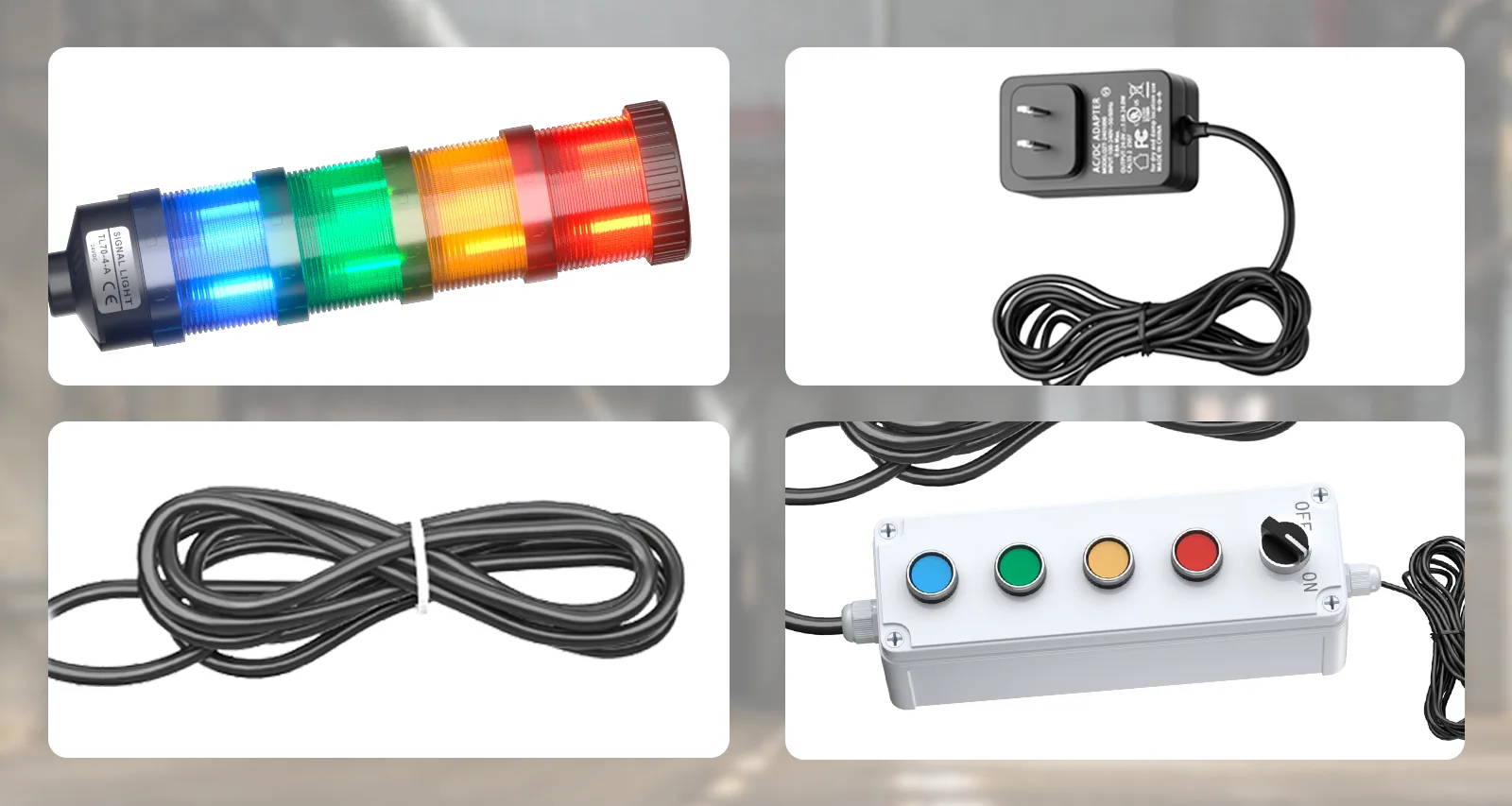
Confirmed package overview
What’s Included
Control Box
Signal Cable
Power Adapter
Package contents may vary by configuration. Confirm the selected model before ordering.
Installation overview
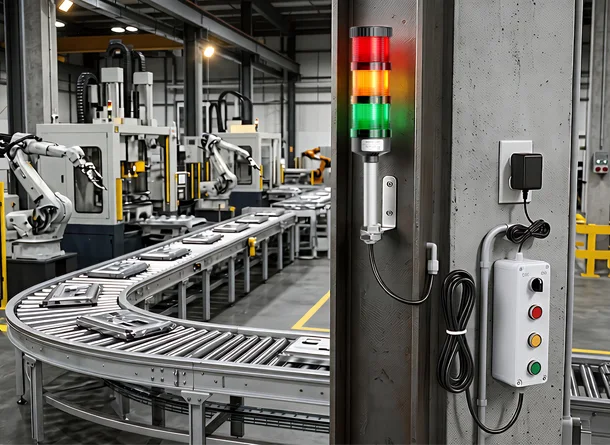
System Setup and Control
Manual control through the included control box.
- Confirm the available power supply is 24VDC.
- Plan the complete signal-cable routing path.
- 0124VDC Power
- 02Manual Control Box
- 03Signal Cable
- 04Tower Light
External integration depends on the selected model, equipment output and control method. Use Technical Support below when these details require review.
Recommendations are starting points and must be confirmed for the equipment.
Applications
Recommended starting configurations for common applications.
Before installation or replacement
Technical Support
Configuration Help
Confirm colors, cable length and alert type.
Control or Wiring
Send the control method or existing wiring information.
Product Replacement
Send the current model or a product photo.
Frequently Asked Questions
Model selection and installation questions, answered clearly.
Standard options include two, three or four signal colors, a 5 m or 10 m cable, and configurations with or without a buzzer.
Choose two colors for simple two-state indication, three colors for common machine-status applications, or four colors when an additional status such as operator call, material request or maintenance indication is required. Signal meanings should follow your facility or machine standard.
A buzzer is useful when an alert requires immediate attention or may not always be visible. Visual-only configurations are suitable when audible indication is not required.
Measure the actual routing path between the controller and the tower light and leave additional length for installation and maintenance.
External integration depends on the selected model, equipment output and applicable control method. Contact us with your machine and control requirements before connection.
Contact us with your selected model, configuration and required information. Available technical details will be provided based on the product and application.
Amazon purchase options are shown for configurations with a valid product link.
Yes. Submit your quantity and application requirements for review. Availability and customization are subject to confirmation.